---
title: How to join a meeting from Vibe Calendar
description: Vibe supports one-click video conferencing with Google Calendar or Outlook Calendar. This feature enables users to start a meeting with a single click on your Vibe home screen. If you need help settin
---
[Skip to content](https://pages.vibe.us/migration/how-to-join-vc-from-vibe-calendar#main-content)
English
Show submenu for translations
[Submit a Support Ticket Here](https://pages.vibe.us/migration/kb-tickets/new?hsLang=en)
![Vibe\_logo\_RGB\_NoText.png\]](https://pages.vibe.us/hs-fs/hubfs/Vibe_logo_RGB_NoText.png?height=40&name=Vibe_logo_RGB_NoText.png)
- [Default HubSpot Blog](https://vibe-2.hubspotpagebuilder.com/)
Open main navigation
Close main navigation
- [Default HubSpot Blog](https://vibe-2.hubspotpagebuilder.com/)
- English
Show submenu for translations
- [Submit a Support Ticket Here](https://pages.vibe.us/migration/kb-tickets/new)
- Go to Vibe.us
Go to Vibe.us
Hello! How can we help you?
- There are no suggestions because the search field is empty.
1. [Vibe Knowledge Base](https://pages.vibe.us/migration?hsLang=en)
2. [Vibe Product FAQ](https://pages.vibe.us/migration/vibe-product-faq?hsLang=en)
3. [Software](https://pages.vibe.us/migration/vibe-product-faq?hsLang=en#software)
# How to join a meeting from Vibe Calendar
Vibe supports one-click video conferencing with Google Calendar or Outlook Calendar. This feature enables users to start a meeting with a single click on your Vibe home screen. If you need help setting it up, please refer to:
- [How to set up one-click video conferencing with your Google Calendar](https://knowledge.vibe.us/1-click-vc-google)
- [How to set up one-click video conferencing with Outlook Calendar](https://knowledge.vibe.us/one-click-vc-microsoft)
Since the latest release **Scandium 2.6.6**, you can now launch meetings from 3rd party video conference platforms other than Google Meet and Zoom.
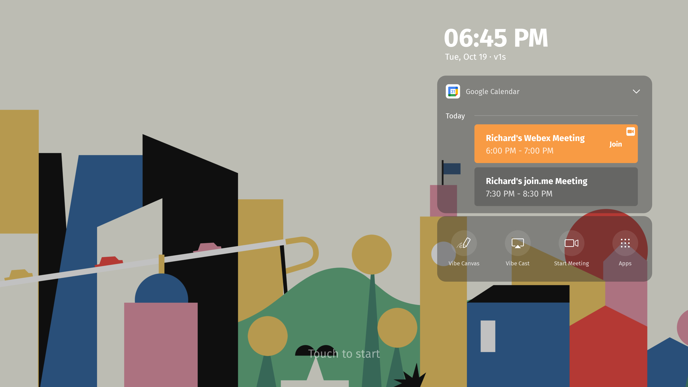
Webex and join.me are now supported on the one-click video conference calendar. Join meeting links from other online conferencing tools may also be launched from your Vibe board calendar, but we cannot guarantee the best experience.
### For Google Calendar
#### 1. Add your meeting link
If you want to use third-party video conference apps other than Google Meet or Zoom (such as WebEx), please install them as a plug-in on your Google calendar. You could refer to [how to install the Zoom plug-in for Google Workspace](https://workspace.google.com/marketplace/app/zoom_for_gsuite/364750910244).
You may also paste your join meeting link in the “Add **description**” or “Add **location**” field on Google Calendar.

#### 2. Sign-in
It is recommended to install the third-party conference applications that may be needed on your Vibe in advance. Please sign in using the same account on Vibe, as on your Google Calendar. In this case, you can join and host meetings on Vibe directly.
#### 3. Join the meeting
You can join a meeting by clicking the join meeting link from your calendar on the home screen. In this case, you're joining the meeting as a guest. For video conferences supported by third-party apps like WebEx and join.me, they will first open in the Chrome browser, then launch the local app to join the meeting.
### For Outlook Calendar
#### 1. Add your meeting link
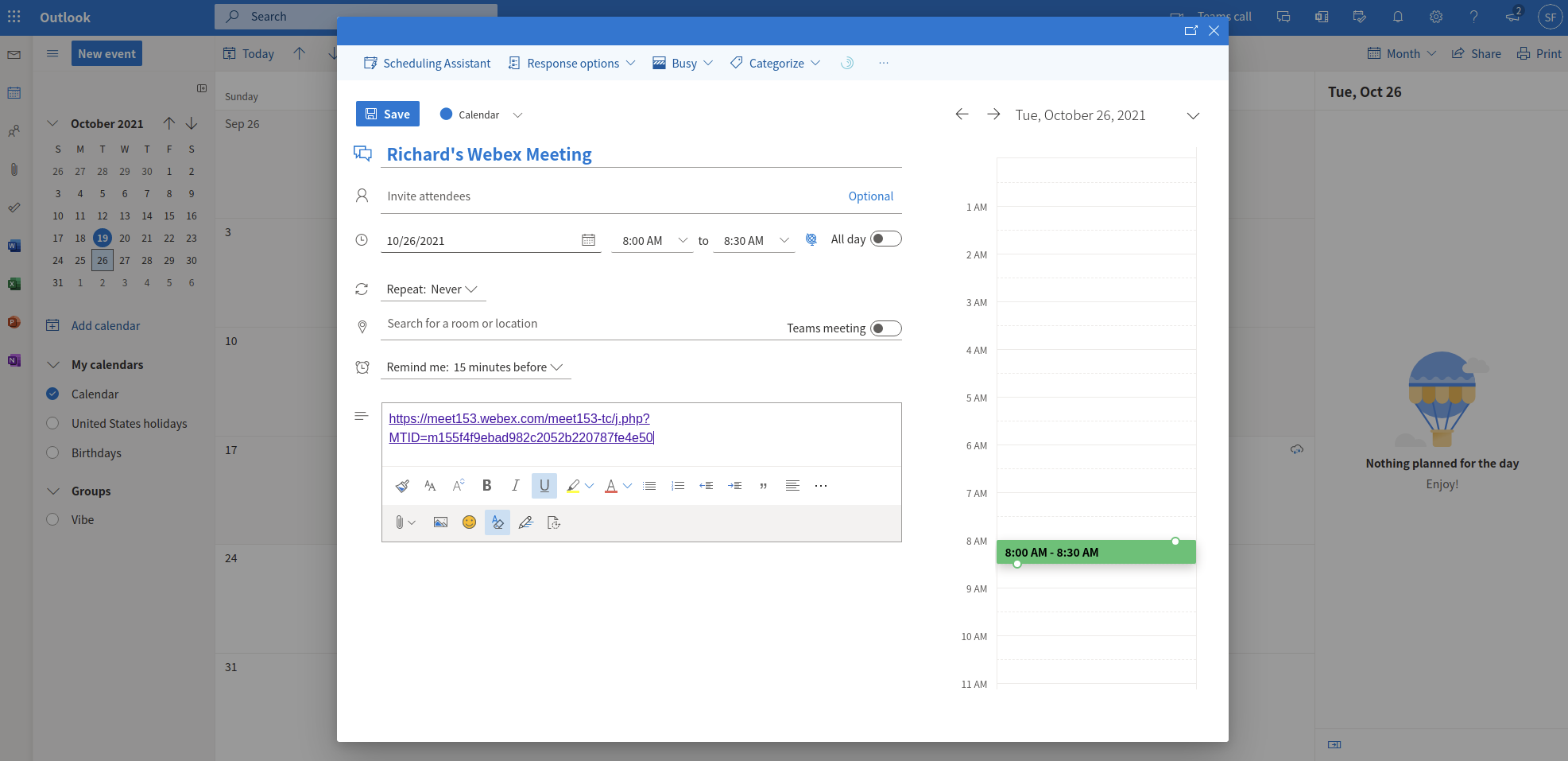
If you want to use third-party video conference apps other than Google Meet or Zoom (such as WebEx), please paste your join meeting link in Outlook Calendar.
#### 2. Sign-in
It is recommended to install the third-party conference applications that may be needed on your Vibe in advance. Please sign in using the same account on Vibe, as on your Outlook Calendar. In this case, you can join and host meetings on Vibe directly.
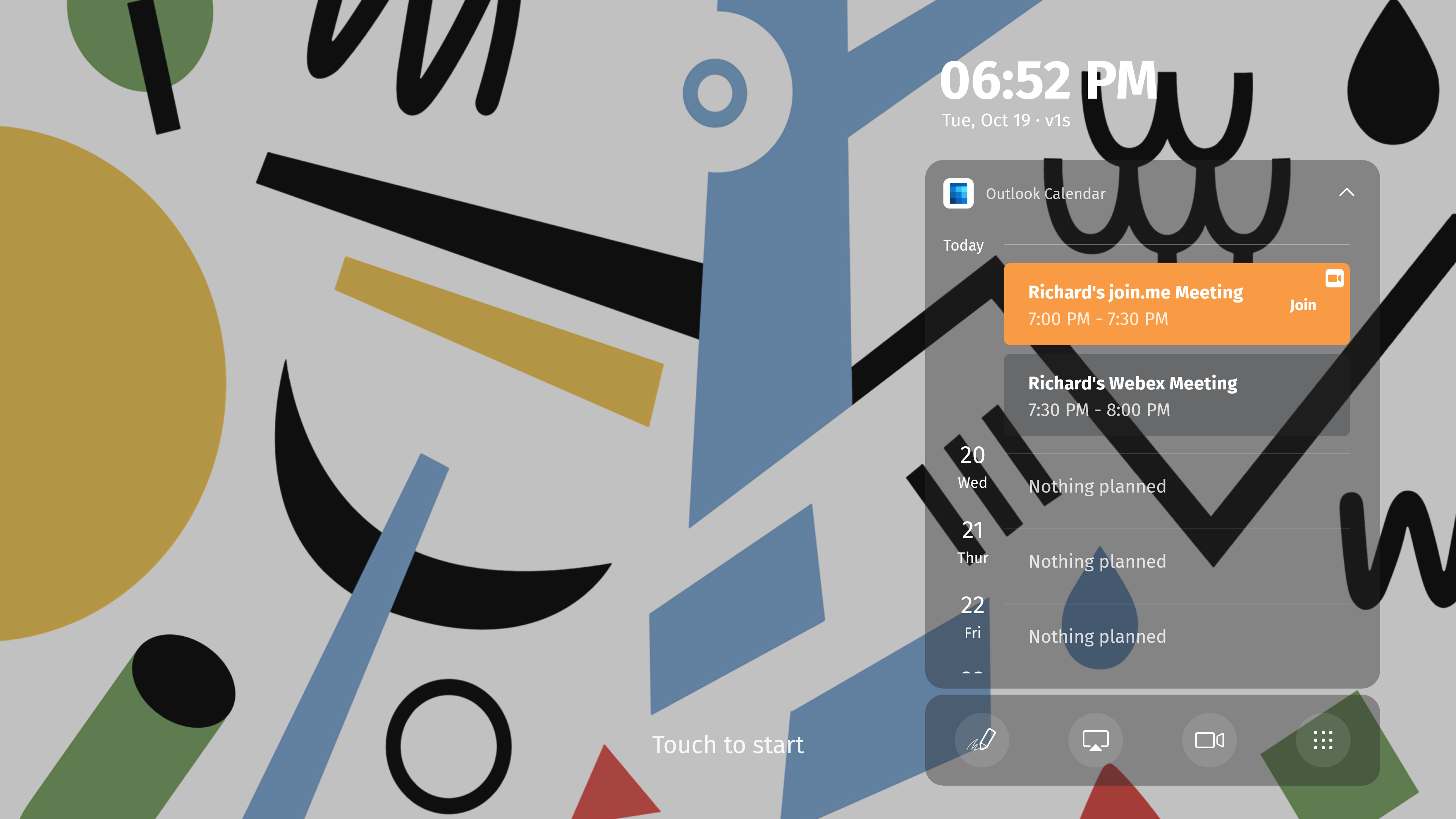
#### 3. Join the meeting
You can join a meeting by clicking the join meeting link from your calendar on the home screen. In this case, you're joining the meeting as a guest. For video conferences supported by third-party apps like WebEx and join.me, they will first open in the Chrome browser, then launch the local app to join the meeting.
- [Vibe Board S1 55″](https://pages.vibe.us/migration/vibe-board-s1-55?hsLang=en#main-content)
- [Getting Started](https://pages.vibe.us/migration/vibe-board-s1-55?hsLang=en#getting-started)
- [Meeting & Presenting](https://pages.vibe.us/migration/vibe-board-s1-55?hsLang=en#meeting-presenting)
- [Troubleshooting](https://pages.vibe.us/migration/vibe-board-s1-55?hsLang=en#troubleshooting)
- [Release History](https://pages.vibe.us/migration/vibe-board-s1-55?hsLang=en#release-history)
- [Vibe Board Pro 75″](https://pages.vibe.us/migration/vibe-board-pro-75?hsLang=en#main-content)
- [Getting Started](https://pages.vibe.us/migration/vibe-board-pro-75?hsLang=en#getting-started)
- [Third party applications](https://pages.vibe.us/migration/vibe-board-pro-75?hsLang=en#third-party-applications)
- [Additional Features](https://pages.vibe.us/migration/vibe-board-pro-75?hsLang=en#additional-features)
- [Troubleshooting](https://pages.vibe.us/migration/vibe-board-pro-75?hsLang=en#troubleshooting)
- [Buyer's FAQ](https://pages.vibe.us/migration/vibe-board-pro-75?hsLang=en#buyers-faq)
- [Release History](https://pages.vibe.us/migration/vibe-board-pro-75?hsLang=en#release-history)
- [Vibe Board 55"](https://pages.vibe.us/migration/vibe-board-55?hsLang=en#main-content)
- [Getting Started](https://pages.vibe.us/migration/vibe-board-55?hsLang=en#getting-started)
- [Release History](https://pages.vibe.us/migration/vibe-board-55?hsLang=en#release-history)
- [Troubleshooting](https://pages.vibe.us/migration/vibe-board-55?hsLang=en#troubleshooting)
- [Vibe SmartCam C1](https://pages.vibe.us/migration/vibe-smartcam-c1?hsLang=en#main-content)
- [Getting Started](https://pages.vibe.us/migration/vibe-smartcam-c1?hsLang=en#getting-started)
- [Troubleshooting](https://pages.vibe.us/migration/vibe-smartcam-c1?hsLang=en#troubleshooting)
- [Release History](https://pages.vibe.us/migration/vibe-smartcam-c1?hsLang=en#release-history)
- [Vibe Product FAQ](https://pages.vibe.us/migration/vibe-product-faq?hsLang=en#main-content)
- [Pricing & How to Order](https://pages.vibe.us/migration/vibe-product-faq?hsLang=en#pricing-how-to-order)
- [Hardware](https://pages.vibe.us/migration/vibe-product-faq?hsLang=en#hardware)
- [Accessories](https://pages.vibe.us/migration/vibe-product-faq?hsLang=en#accessories)
- [Software](https://pages.vibe.us/migration/vibe-product-faq?hsLang=en#software)
- [Shipping](https://pages.vibe.us/migration/vibe-product-faq?hsLang=en#shipping)
- [Additional FAQs](https://pages.vibe.us/migration/vibe-product-faq?hsLang=en#additional-faqs)
- [What's New?](https://pages.vibe.us/migration/whats-new?hsLang=en#main-content)
- [Vibe Board S1 55"](https://pages.vibe.us/migration/whats-new?hsLang=en#vibe-board-s1-55)
- [Vibe Board Pro 75″](https://pages.vibe.us/migration/whats-new?hsLang=en#vibe-board-pro-75)
- [Vibe Board V1 55″](https://pages.vibe.us/migration/whats-new?hsLang=en#vibe-board-v1-55)
- [Vibe SmartCam C1](https://pages.vibe.us/migration/whats-new?hsLang=en#vibe-smartcam-c1)
- [Canvas 2.0](https://pages.vibe.us/migration/whats-new?hsLang=en#canvas-2-0)
- [Which Vibe Model do I own?](https://pages.vibe.us/migration/which-vibe-model-do-i-own?hsLang=en)
- [Vibe Software](https://pages.vibe.us/migration/vibe-software?hsLang=en#main-content)
- [Canvas 2.0](https://pages.vibe.us/migration/vibe-software?hsLang=en#canvas-2-0)
- [Vibe One](https://pages.vibe.us/migration/vibe-software?hsLang=en#vibe-one)
- [Vibe Cast](https://pages.vibe.us/migration/vibe-software?hsLang=en#vibe-cast)
- [Vibe Admin Console](https://pages.vibe.us/migration/vibe-software?hsLang=en#vibe-admin-console)
- [Default HubSpot Blog](https://vibe-2.hubspotpagebuilder.com/)
[](https://knowledge.vibe.us)
Vibe Knowledge Base
Copyright © 2026, Vibe Inc.