![Vibe_logo_RGB_NoText.png]](https://pages.vibe.us/hs-fs/hubfs/Vibe_logo_RGB_NoText.png?height=40&name=Vibe_logo_RGB_NoText.png)
To get started, please create an admin account and team workspace on Vibe's Admin console.
Then, you’ll need to set up a connection (or connector) for Vibe with your IDP. Many SSO providers are supported by Vibe for user management:
If your identity provider is different from the ones listed above, please send us an email about your SAML IDP to support@vibe.us and our support team will get in touch with you.
Okta
- We don't support SCIM user provisioning and de-provisioning. This is on our roadmap.
- Please be advised that SSO is only applicable to Vibe's web, iPad, and mobile apps. To login to Vibe Board, users will need to use email-based 2FA login or use the SSO logged-in mobile app to scan a QR code.
Step 1: Set up SAML SSO for Vibe
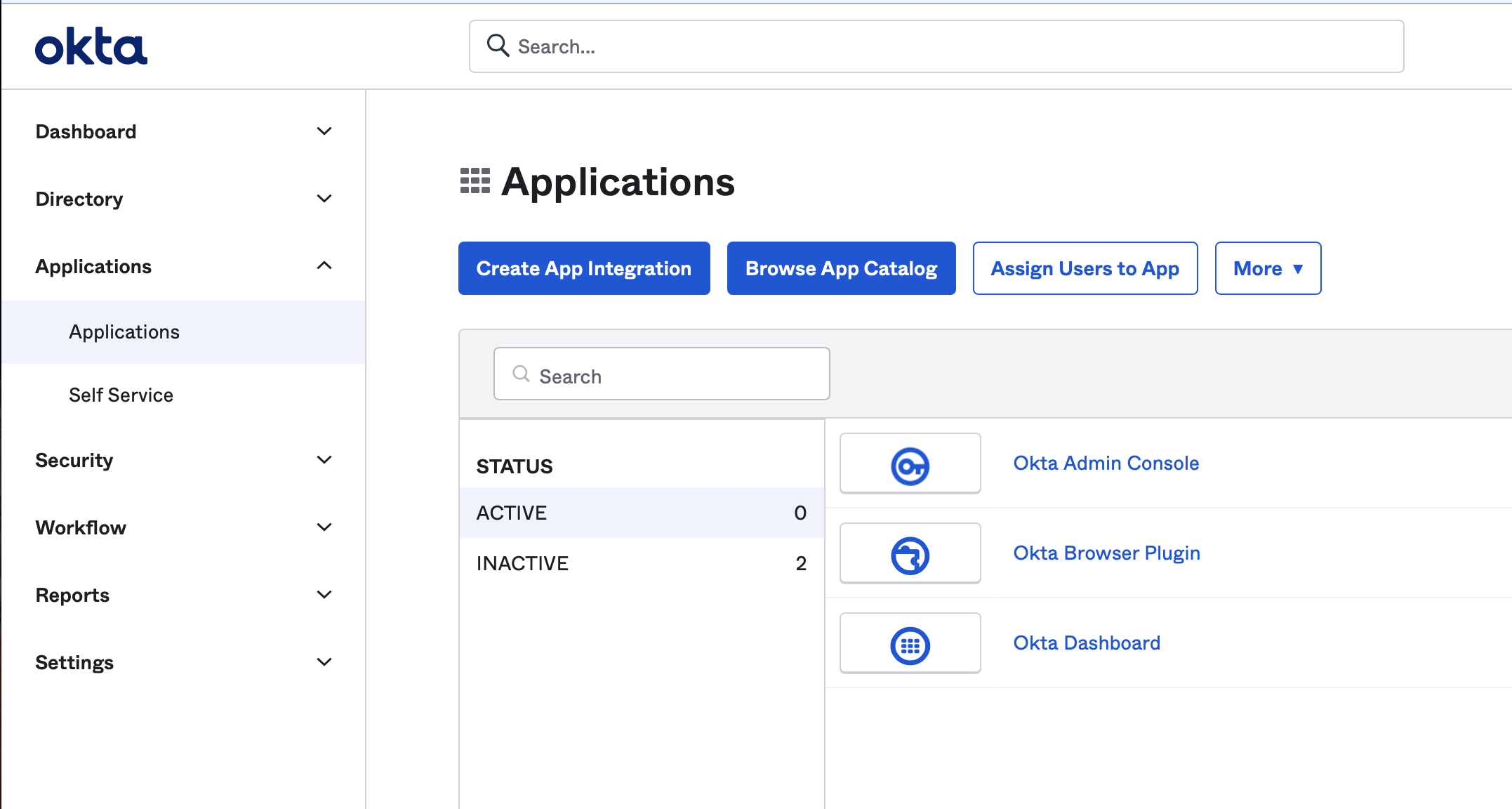
Create an App Integration for Vibe first. In your Okta Admin console, navigate to Applications, and click "Create App Integration" button.
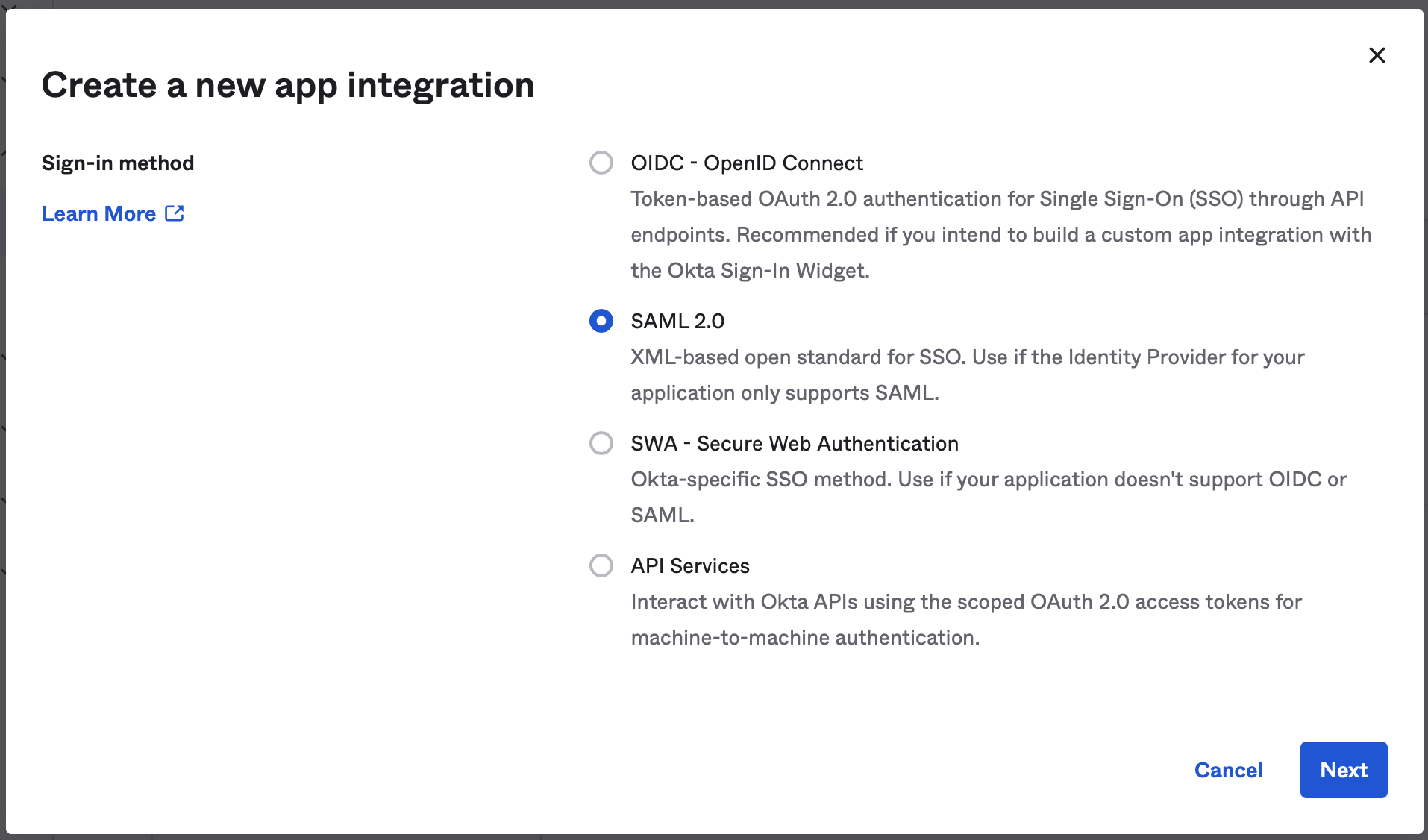
Choose "SAML 2.0" sign in method.
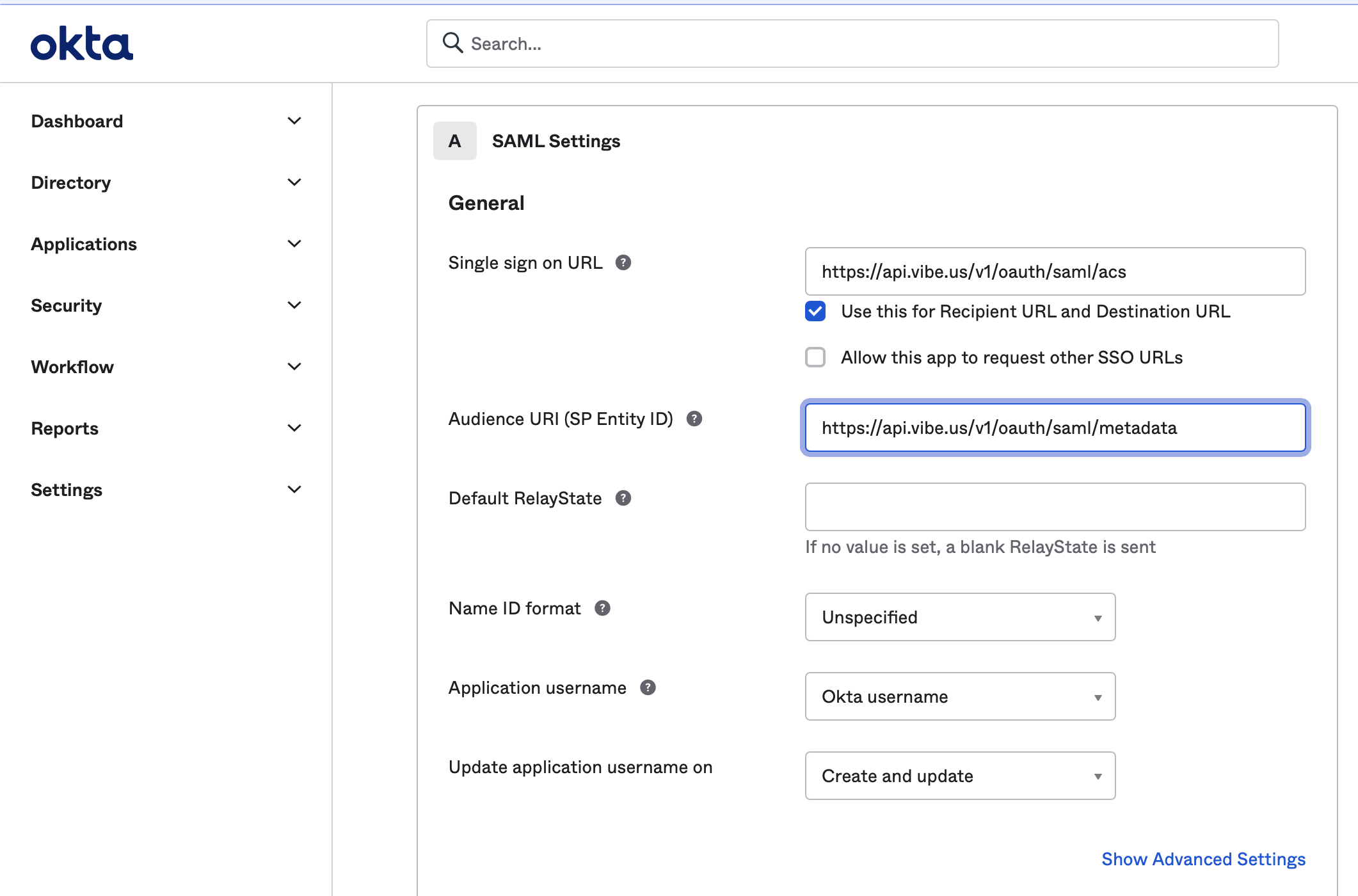
Enter "Vibe" as App name, and in the next screen, enter "https://api.vibe.us/v1/oauth/saml/acs" as "Single Sign On URL" and "https://api.vibe.us/v1/oauth/saml/metadata" as "SP Entity ID".
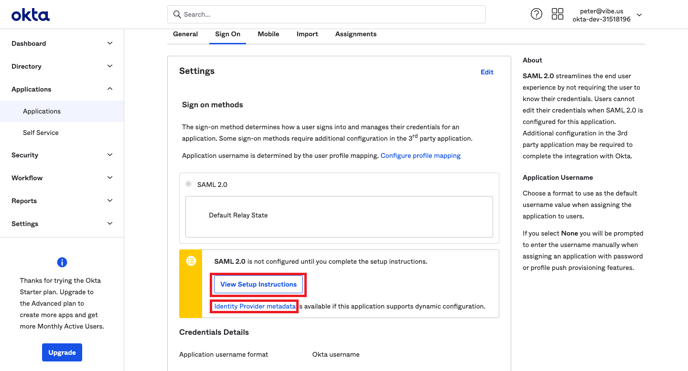
- Identity Provider metadata (usually in form of an XML file)
- View Setup Instructions - Identity Provider Issuer
- Start URL: https://yourcompanydomain.sso.vibe.us/
You can select your subdomain name, but there cannot be dots in between. - The email address associated with your organization admin account on https://admin.vibe.us
Step 2: Configure your identity provider
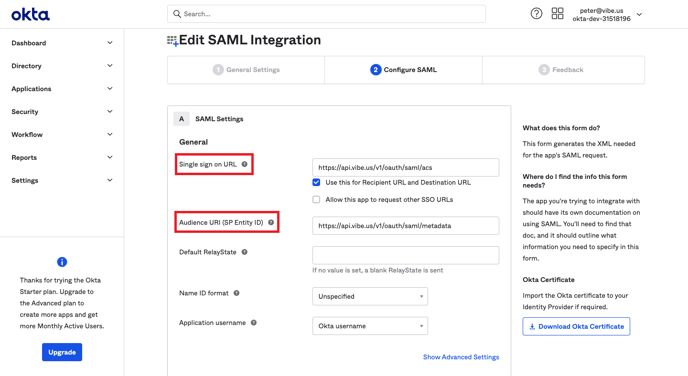
- Single sign on URL: https://api.vibe.us/v1/oauth/saml/acs
- Audience URI (SP Entity ID): https://api.vibe.us/v1/oauth/saml/metadata
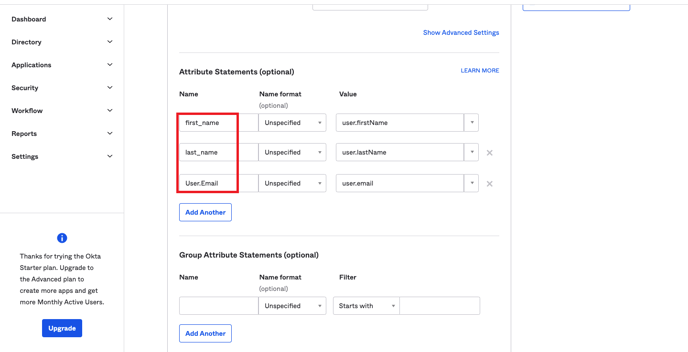
- Attribute mapping:
- first_name
- last_name
- User.Email
Do you support an IDP-initiated login so our user can use an 'app' within our Okta Dashboard?
Currently, this is not supported however Okta has a workaround where you may enter the URL, https://yourcompanydomain.sso.vibe.us, in the Okta chiclet. The experience should be the same as IDP initiated login.
Microsoft Azure
. You will be using the start URL to log in as shown in point (3) below. You can select your subdomain name.
- ACS URL: https://api.vibe.us/v1/oauth/saml/acs
- Entity ID: https://api.vibe.us/v1/oauth/saml/metadata
- Start URL: https://yourcompanydomain.sso.vibe.us/
Step 2: Set up SAML SSO for Vibe
Vibe requires the following information (outgoing claim type) when you set up attribute mapping:
- User.Email
- first_name
- last_name
After setting up attribute mapping, your User Attributes & Claims in Azure AD should look like this:
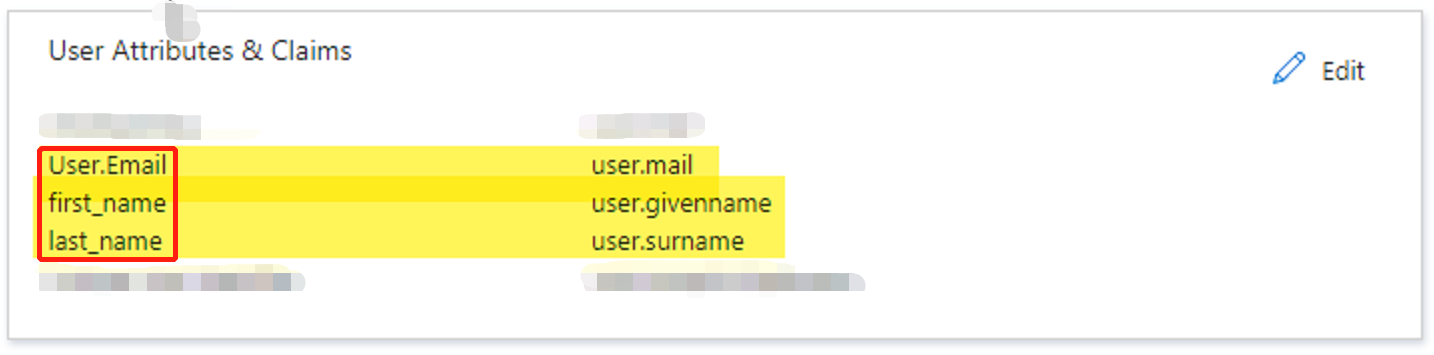
Please note for each Manage Claim panel in Azure AD:
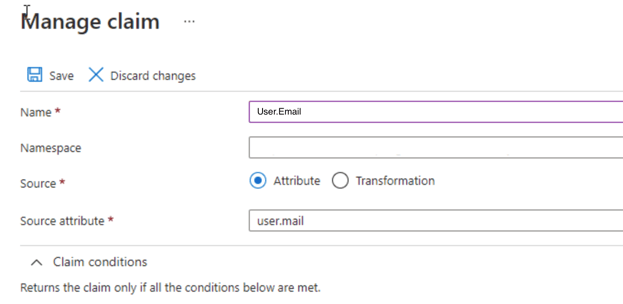
- Name should be the outgoing claim that Vibe expects, such as User.Email
- Leave the optional Namespace field empty (Azure AD prefills this field, please make sure to delete auto-generated namespace)
- Source should be "Attribute"
- Source attribute should be the attribute in Azure AD.
G Suite (SAML)
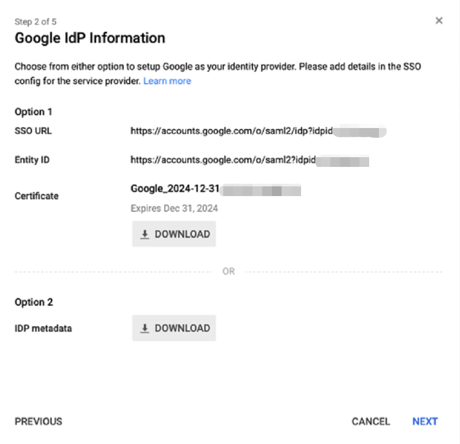
- SSO URL
- Entity ID
- Certificate
- IDP metadata
- The email address associated with your organization's admin account on Vibe admin console.
Step 2: Configure your identity provider
Please use the following settings to configure your SAML app:
- ACS URL: https://api.vibe.us/v1/oauth/saml/acs
- Entity ID: https://api.vibe.us/v1/oauth/saml/metadata
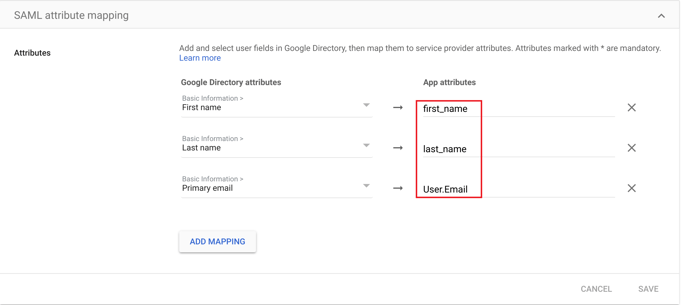
- Mappings:
First name <-> first_name
Last name <-> last_name
Primary email <-> User.Email
Once configured, you can use https://yourcompanydomain.sso.vibe.us/ to log in.