How to open USB files from an app on the Vibe Board Pro 75" and the Vibe Board S1 55"
Easily add files to the Vibe Board Pro 75" and Vibe Board S1 55" from a USB storage drive giving access to these files for all apps on the board by transferring the file to the board storage
- Plug your USB thumb drive into one of the USB ports on the Vibe Board.
- Open the Files application from the desktop

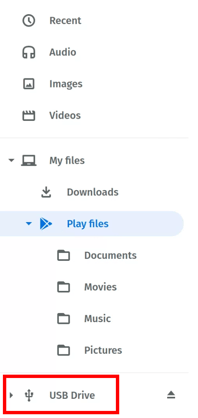
- Click on the USB folder in the list on the left
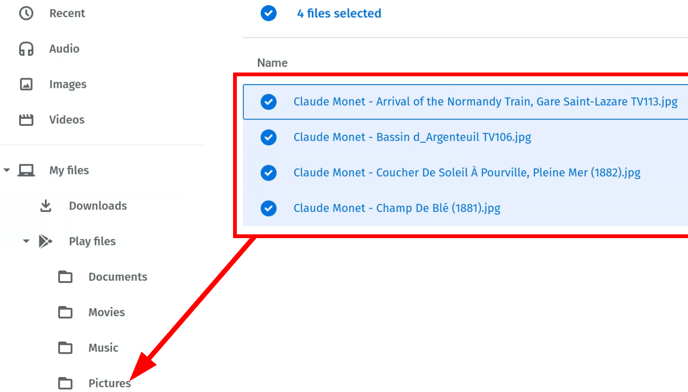
- Highlight the file/s you need and drag them to the Play Files -> Pictures folder or Documents folder depending on your need.
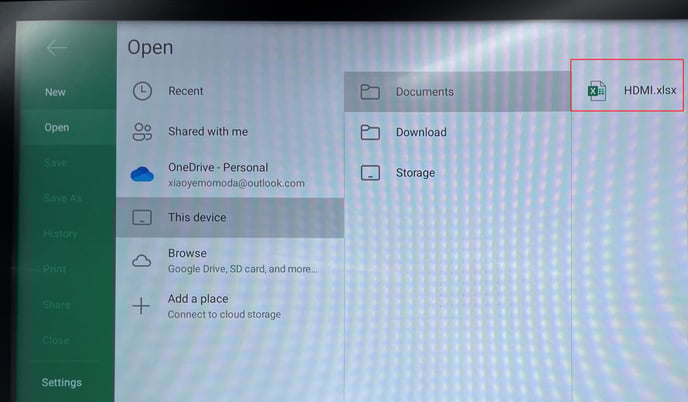
- Open the file from your app, for example, this Excel file was moved from the USB to the Documents folder of the board: